
 |
|
|
|
|
|
 |


 |
Charging two lipo's at once??? |
 |

|
 |

|
(#1)
|
|
Guest
Posts: n/a
|
Charging two lipo's at once??? -
07.07.2009, 07:27 PM
I have a problem I can't seem to figure out. I am trying to charge two 3s lipos on my charger but something is wrong, I nearly destroyed one set of lipo's already because of this so I figured I would post my issue here and hopefully someone here can tell me what I'm doing wrong or why this is happening.
As you can see in the picture I have a 2 3s to 6s jst adapter plugged into the charger (it appears to be wired correctly) and I have a deans plug series adapter (you can see the scorch marks on it) Basicly if I connect just the series adapter everything is fine or if I connect just the balance adapter everything is fine, but if one is connected and I go to connect the other it shorts out (and startles the crap out of me!). I have a 2 4s too 8s adapter that I use with no problem with my two 4s packs and thats what has me perplexed, I can't see any difference that would be causing a short on one and not the other? Hopefully someone here can see where my problem is in the picture???? Hope I explained that clearly enough. Thanks for any help. 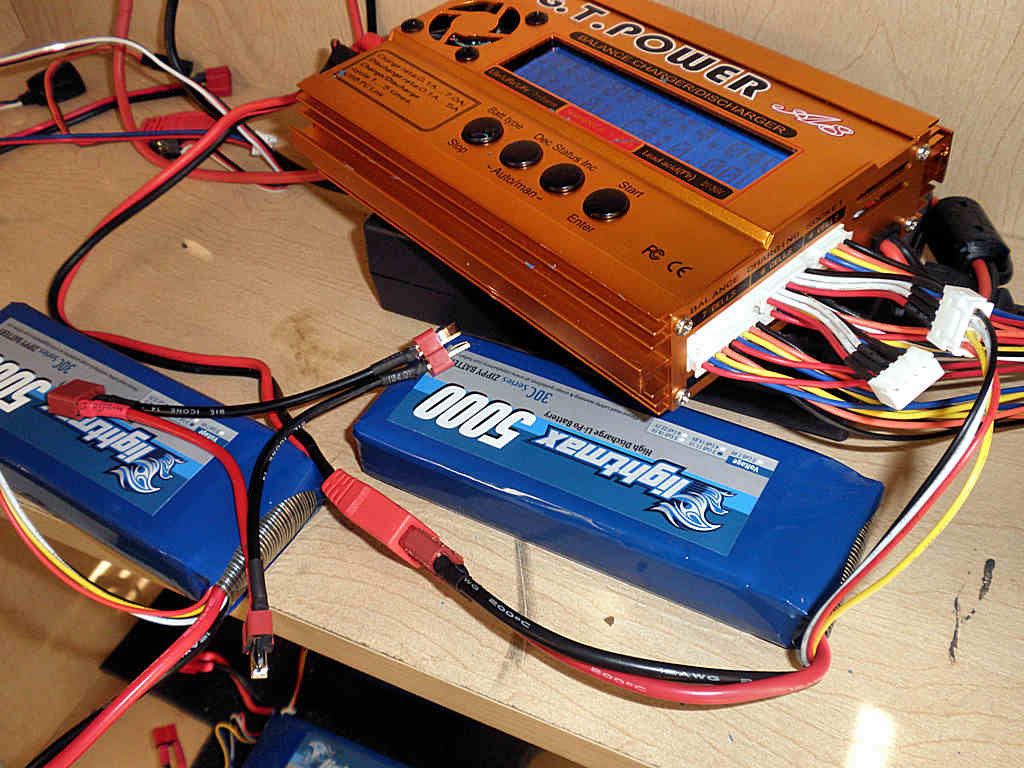
|
|
|

|
 |
 |
 |
|
|
|
|
|
|
(#2)
|
|
RC-Monster Carbon Fiber
Offline
Posts: 225
Join Date: Sep 2008
Location: Suomi Finland Perkele
|
07.08.2009, 08:08 AM
I think your problem is that you connect it "wrong", connect balance plug and see which battery is "1." and then connect correct deans. Its hard to explain...
What you are doing is you connect battery 1 to deans battery 1 but then balance plug goes in battery 2 slot, thats why its causing short circuit. You have to check which balance plug is for battery 1 and which is for battery 2. |
|
|
|
|
|
|
|
|
|
|
|
|
(#3)
|
|
E-Maxx Lover
Offline
Posts: 198
Join Date: Dec 2006
Location: kuwait
|
07.08.2009, 12:28 PM
same problem here I wanr resolve this problem please
what is the step do i have to use. plug the balance adapter then plug the deans then start charge or what??? is that right anyone can explain what is the right step MMM v3 Rc-monster 2x2s 5200mah-HC medusa 36-70-2300kv Pic's - video - youtube video's |
|
|
|
|
|
|
|
|
|
|
|
|
(#4)
|
|
RC-Monster Mod

Offline
Posts: 6,597
Join Date: Apr 2007
Location: NJ
|
07.08.2009, 12:49 PM
you have to make sure you have 1+ - 2+ - on both the battery connection and the the tap connection
You connected as 1+ - 2+ - on battery and 2+ - 1+ - this creates a short in the connections. The safest way is NOT to bridge the - and + balance tap connection bits together - this way if you mis-connect you don't get fire...  Note red wire removed from second (-) side pack |
|
|
|
|
|
|
|
|
|
|
|
|
(#5)
|
|
RC-Monster Admin

Offline
Posts: 14,609
Join Date: Nov 2005
Location: Des Moines, IA
|
07.08.2009, 01:00 PM
The only way to describe it really is with a picture:
In this pic the red wire that is disconnected IS connected on your harness. So, if you accidentally swap the two balance wires around, you will short out the pack and WILL burn up a balance wire and/or connector. You have to figure out which balance connector is the "most positive" and zip-tie it to the most positive main lead. I've taken your original pic and circled the wires that should be tied together so you don't accidentally mix them up - the green circled balance wire tied to the green circled main wire, and the same with the purple circled wires:  When you're done, the cables should be tied together similar to this (except shorter since your balance wires are so short: 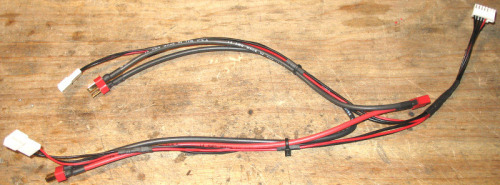
|
  |
|
|
|
|
|
|
|
|
|
|
(#6)
|
|
Guest
Posts: n/a
|
07.08.2009, 06:05 PM
ok, I think I understand where I went wrong now after those explanations. Thanks for all the help:)
I had not read anywhere that one specific plug on the series adapter always had to connect to the battery that was connected to the first balance plug on the balance adapter. One more question....if I disconnect the red wire that connects to the black wire in the middle of the 6s plug, that should eliminate the short if I missconnect them correct? In that case what happens if I missconnect them?...will the packs just not charge? will it harm the charger? Will it only balance one pack? Thanks again  You know whats funny, I have charged my 4s and some other 3s packs this way many times in the past, it must have just been dumb luck that I never connected them backwards like the last three times I have tried. |
|
|
|
|
|
|
|
|
|
|
|
|
(#7)
|
|
RC-Monster Admin
Offline
Posts: 14,609
Join Date: Nov 2005
Location: Des Moines, IA
|
07.08.2009, 06:16 PM
That balance plug you have was really meant to be charged through solely without the main leads attached. But, that would limit charge rate to ~2A because the wires and connectors are small. The only way to charge at full 1C rate would be to use the main harness as well, and that's where the problem came in.
Yes, removing one of those common wires should eliminate problems. I say "should" because the charger internal circuits may be bridging them anyway. Best solution is to physically tie the proper balance plug with the proper leg of the main Y harness. |
|
|
|
|
|
|
|
|
|
|
|
|
(#8)
|
|
|
Guest
Posts: n/a
|
07.08.2009, 06:27 PM
Quote:
This charger starts beeping and says "battery disconnected" if I don't have the main charge lead connected when I try to charge so I don't think it will charge through the balance plugs alone even if I wanted to. Thanks again! |
|
|
|
|

|
|
|
|
|
|
|
|
|
(#9)
|
|
|
RC-Monster Admin
Offline
Posts: 14,609
Join Date: Nov 2005
Location: Des Moines, IA
|
07.08.2009, 06:33 PM
No problem.
Quote:
|
|
|
|
|
|
|
|
|
|
|
|
|
|
(#10)
|
|
RC-Monster Carbon Fiber
Offline
Posts: 225
Join Date: Sep 2008
Location: Suomi Finland Perkele
|
07.09.2009, 08:52 AM
I would recomend to remove wire from housing and shrink wrapping it, NOT cutting it.
So you can undo it if needed. |
|
|
|
|
|
|
|
|
|
|
|
|
(#11)
|
|
Guest
Posts: n/a
|
08.20.2009, 02:32 PM
Can I check if I use this:
http://www.swanghobby.com/flyermate-...1-pr-1679.html What charge rate should I set on the charger? I use 2s 5000mAh lipos. Can I set it on 4s and charge at 5A? would charging time be lengthened by charging 2 lipos together? |
|
|
|
|
|
|
|
|
|
|
|
|
(#12)
|
|
|
Guest
Posts: n/a
|
08.20.2009, 05:33 PM
Quote:
It should work. Your charge rate settings depends on what you're charging though. To charge two 3s 5000 mah packs at once for instance, you would set the charger to 6s and 5 amp charge rate...it shouldn't take much longer than charging a single pack. |
|
|
|
|
|
|
|
|
|
|
|
|
|
(#13)
|
|
Guest
Posts: n/a
|
08.21.2009, 01:37 AM
So if normally I take an hour to complete charging my 2s 5000mAh lipo using charging rate of 2A, if I use the item above, and charge 2 x 2s 5000mAh at 4A, will charging be completed in an hour or longer?
|
|
|
|
|
|
|
|
|
|
|
|
|
(#14)
|
|
Brushless Mentat

Offline
Posts: 353
Join Date: Jun 2009
Location: Outside Louisville KY
|
08.21.2009, 05:00 AM
by 2 40 dollar chargers or get a hyperion duo. easy peasy
8ight 1.0 & 2.0 | 8ight-T 1.0 & 2.0 | E-Revo BL Edition | T-Maxx | Slash | Raze-ST | XXX-NT Drake | 3PKS | DX3S Telemetry |
|
|
|
|
|
|
|
|
|
|
|
|
(#15)
|
|
|
Guest
Posts: n/a
|
08.21.2009, 03:04 PM
Quote:
My 2 3s packs take about 15 minutes longer to charge together than individually. |
|
|
|
|
|
|
|
 |
«
Previous Thread
|
Next Thread
»
| Currently Active Users Viewing This Thread: 1 (0 members and 1 guests) | |
 Linear Mode

|
|

Powered by vBulletin® Version 3.8.11
Copyright ©2000 - 2026, vBulletin Solutions Inc.
vBulletin Skin developed by: vBStyles.com
Copyright ©2000 - 2026, vBulletin Solutions Inc.
vBulletin Skin developed by: vBStyles.com
