
 |
|
|
|
 |


 |
CC Blower....Blows |
 |

|
 |

|
(#1)
|
|
RC-Monster Carbon Fiber

Offline
Posts: 376
Join Date: Oct 2009
Location: Nashville,TN
|
CC Blower....Blows -
05.09.2010, 10:15 AM
Thought I would give a quick review of the new CC Blower, all I can say is it does just that..BLOWS! After just three heats and the A main there wasn't a single blade remaining on the fan! Good idea but it will not hold up to the demands of 1/8th off road racing and yes there are several large chassis slapping jumps on the track that I race at, as all good 1/8th tracks do. Definitely not worth the money or the time it takes to install it.
|
|
|

|
 |
 |
 |
|
|
|
|
|
|
(#2)
|
|
RC-Monster Brushless
Offline
Posts: 3,156
Join Date: Jul 2005
Location: Gramercy, LA
|
05.09.2010, 08:45 PM
Not doubting what happened to yours, but about 90% of our 1/8th drivers have them and never complained once about them.
Sorry for your bad luck with it. |
 |
|
|
|
|
|
|
|
|
|
|
(#3)
|
|
i pwn nitro

Offline
Posts: 769
Join Date: Nov 2008
Location: with ur GF
|
05.10.2010, 02:46 AM
must be like one of them new blade less fan designs
 they had them for sale at a local shop for moving air about the house, just a centrifugal fan in the base and a big ring on top in which air came out of the perimeter. they suc....err...blew as well. what a pathetic idea THAT was they had them for sale at a local shop for moving air about the house, just a centrifugal fan in the base and a big ring on top in which air came out of the perimeter. they suc....err...blew as well. what a pathetic idea THAT was
the porthole from the noob world an here has been opened!! that's how i got in. |
 |
|
|
|
|
|
|
|
|
|
|
(#4)
|
|
RC-Monster Carbon Fiber
Offline
Posts: 376
Join Date: Oct 2009
Location: Nashville,TN
|
05.10.2010, 09:22 AM
I'm not giving up on the idea, just the bushing motor that Castle chose to use for reasons of cost I am sure. Found some 30x30x7mm "ball bearing" fans online for about 8 bucks shipped, so I bought two one to go in the CC Blows and one for my MMM that I discovered after tear down and clean up that the fan no longer works on it...go figure! I will just have to reuse the wires off the other two, no big deal there. Like I said, it's a good concept just a cheap fan. Even with one blade missing after the first heat my motor came back about 20deg. cooler than it normally runs, normally it's 155deg. with the fan 135deg.
|
|
|
|
|
|
|
|
|
|
|
|
|
(#5)
|
|
RC-Monster Titanium
Offline
Posts: 1,007
Join Date: Apr 2010
|
05.12.2010, 05:55 AM
if you change the fan on your MMM could you do a write up with pics??? Something i would be looking into doing but not sure what parts to buy etc....
I was also looking into the blower, but after seeing pics of it being quite cheap looking, i was a little hesitant... I may still consider one... Thanks Josh |
|
|
|
|
|
|
|
|
|
|
|
|
(#6)
|
|
|
RC-Monster Carbon Fiber
Offline
Posts: 376
Join Date: Oct 2009
Location: Nashville,TN
|
05.12.2010, 06:18 AM
Quote:
|
|
|
|
|

|
|
|
|
|
|
|
|
|
(#7)
|
|
RC-Monster Titanium
Offline
Posts: 1,007
Join Date: Apr 2010
|
05.12.2010, 07:25 AM
thanks a lot! Something i will def look into !
|
|
|
|
|
|
|
|
|
|
|
|
|
(#8)
|
|
RC-Monster Carbon Fiber
Offline
Posts: 376
Join Date: Oct 2009
Location: Nashville,TN
|
05.13.2010, 08:31 PM
Well Josh the new fans showed up yesterday and they are a perfect fit in the MMM and CC Blows. As you wanted I will post a few pics as I go through the swap over, but first I want to explain why I do the wiring like I do. To begin I don't try and desolider and resolider the wires to the PC board on the back of the motor because the solider points are tiny, very close together and recessed in the plastic motor case. To me it's just not worth the risk of all the things that could go wrong like over heating the PC board or overlapping solider joints and on and on, so this is how we do it.
Here's what you get for the money 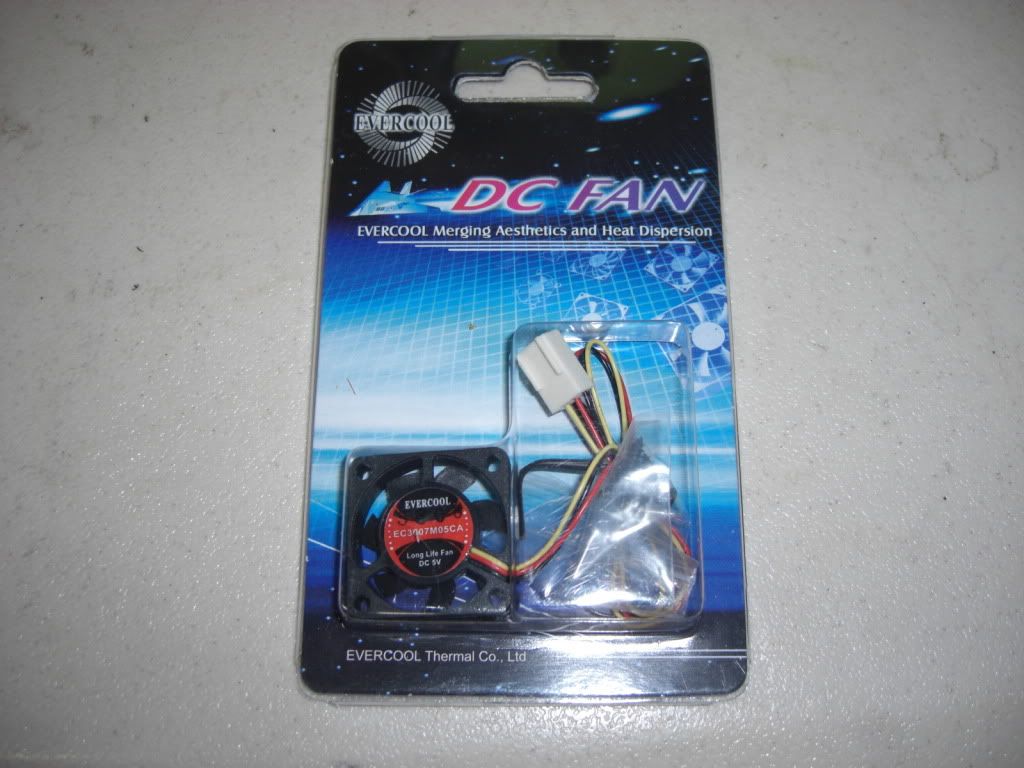 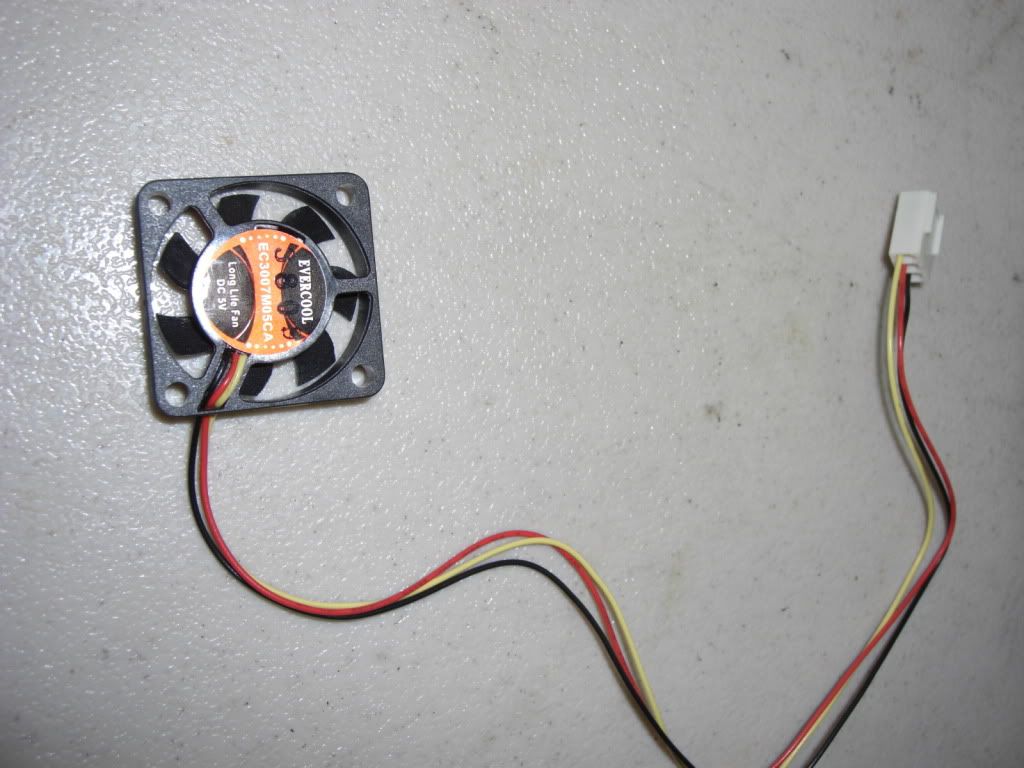 You will notice that the new fan comes with three wires, red, black and yellow. The yellow wire is not needed so cut it off as short as you can then cut the red and black wires leaving them long enough to work with. 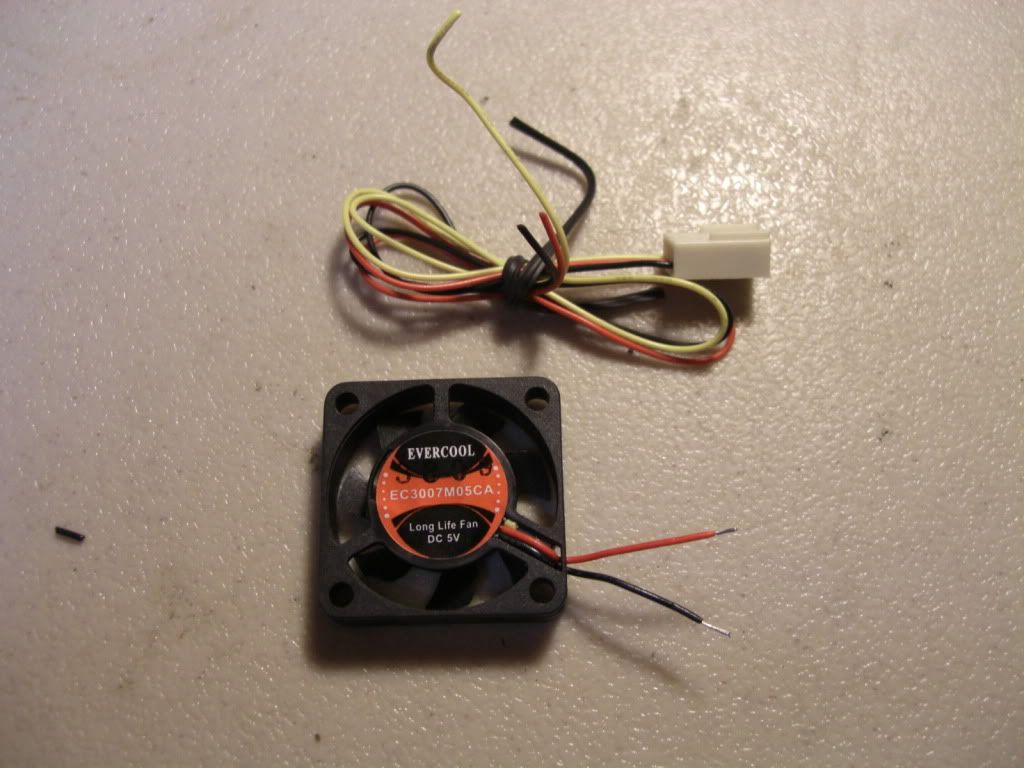 Cut the wire to be reused off the old fan in about the same place that you cut the wire from the new one, this way the wire after joined will be about the same as the original. Then strip the insulation back on the ends to be joined about 1/8" apply flux paste to the bare wires and pretin with a small amount of solider, cut two pieces of heat shrink tubing 3/8" long and slide it over the wires back far enough that the heat won't get to it when you solider the wires together. Allot of people use the helping hands jig to solider wires together, I prefer a 1/4" thick piece of ceramic tile and a small lite weight clamp, a cloths pin will do. Now clamp the fan to the tile and solider the wires together, then slide the shrink tubing over the joint and shrink it with a heat gun or lighter. Slap that sucker back in the case, plug it up and you are good to go. 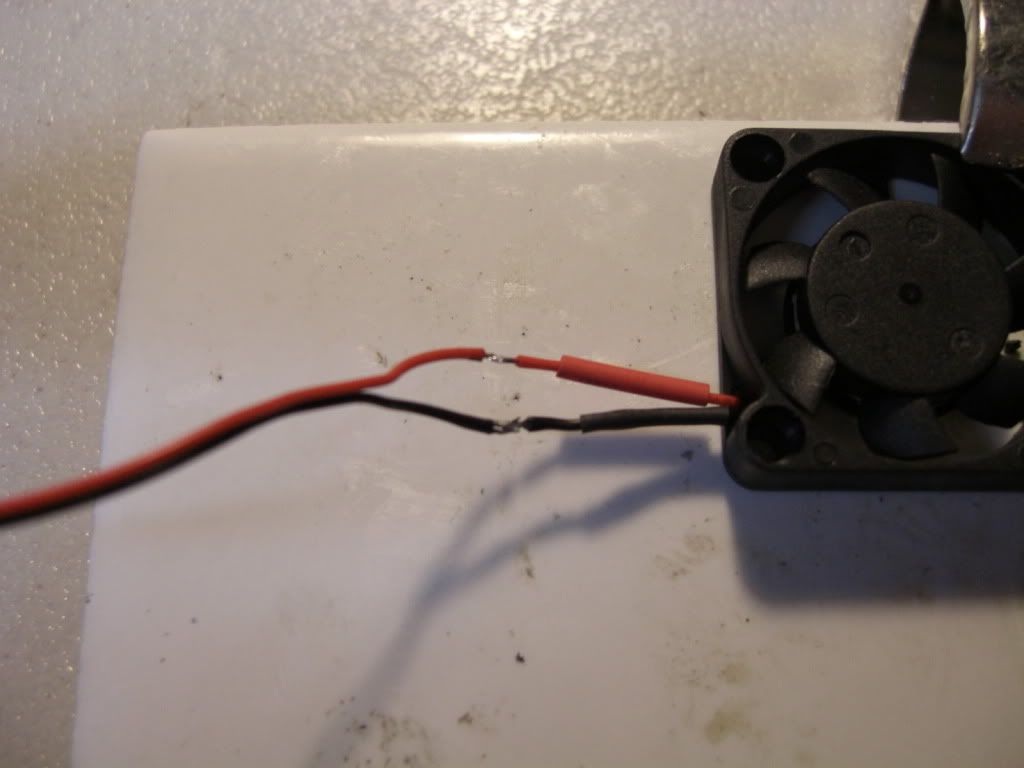 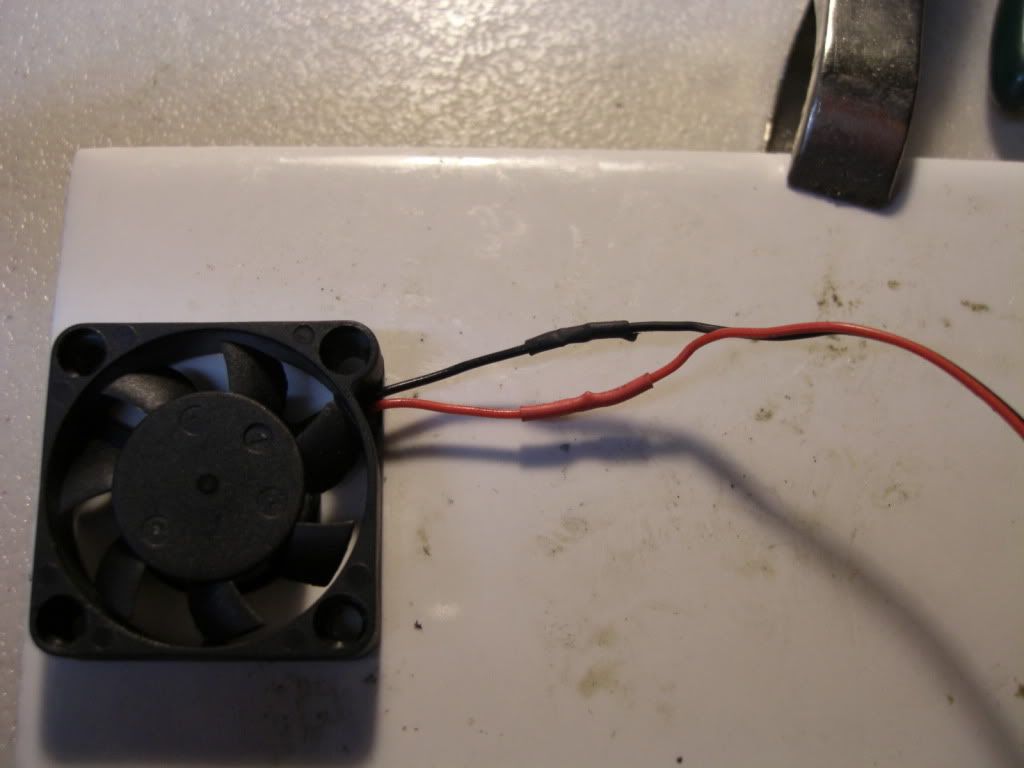  There are several differences that I noticed between the ball bearing and the old bushing fans, first off the motor is larger on the bearing unit therefore the blades are a little shorter and beefier, that's a plus also there is no up and down play on the ball bearing fan like there is on the bushing fan. Not sure what the CFM is but I can tell that the new fans are moving more air. 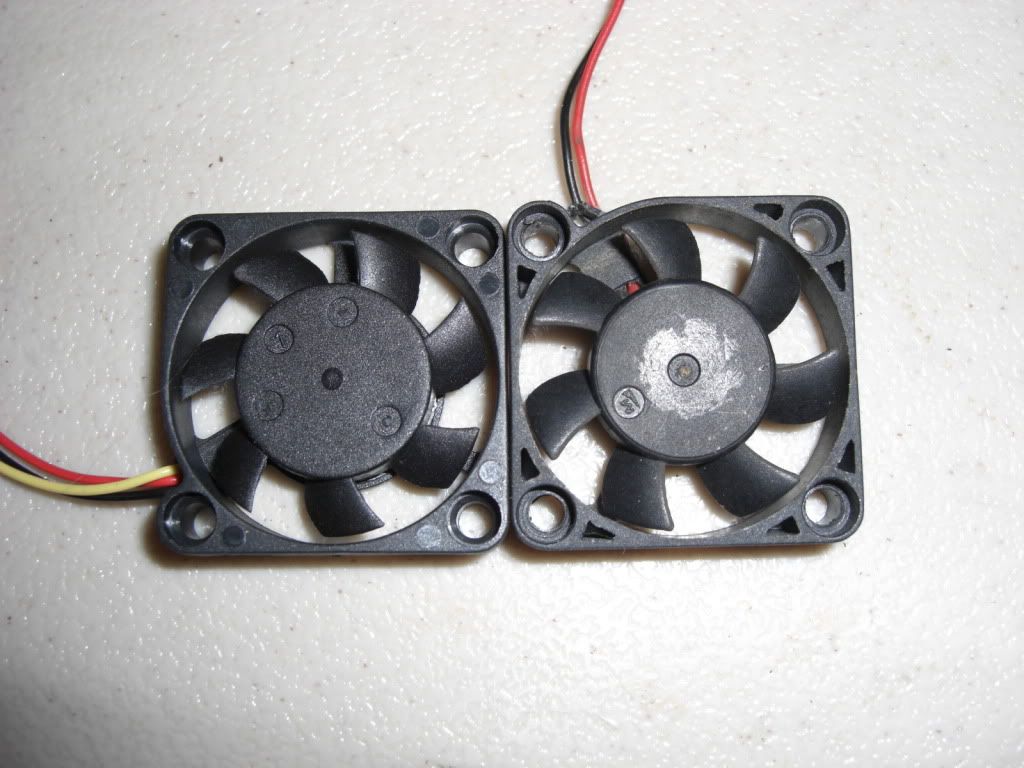 A side note on the CC Blows, when they made the fan shroud that fits over the motor they didn't allow any place for the air to exit after the fan pulls it in! So I cut away 5/8" between the two zip tie tracks leaving about 5/32" between the shroud and the motor. That way the air can exit almost as fast as it enters, taking the heat with it! Witch after all is the purpose of the blower....isn't it? Hope this is of some help GeorgeC |
|
|
|
|
|
|
|
|
|
|
|
|
(#9)
|
|
Guest
Posts: n/a
|
06.23.2010, 12:37 PM
George, where did you order the fans from? Need to pick up a few.
My cc blower fan lost one blade in the first night of running. Like the blower, hate the fan. Already lost two fans in my ESCs too. Need a reliable replacement. ben |
|
|
|
|
|
|
|
|
|
|
|
|
(#11)
|
|
Guest
Posts: n/a
|
06.23.2010, 12:50 PM
Awesome, just order 4. Thanks for the research, post and info.
ben |
|
|
|
|
|
|
|
|
|
|
|
|
(#12)
|
|
RC-Monster Carbon Fiber
Offline
Posts: 376
Join Date: Oct 2009
Location: Nashville,TN
|
06.23.2010, 12:52 PM
My pleasure!
|
|
|
|
|
|
|
|
|
|
|
|
|
(#13)
|
|
RC-Monster Aluminum

Offline
Posts: 929
Join Date: Mar 2009
Location: Las Vegas NV
|
06.23.2010, 03:30 PM
damn, out of stock. i have a MMM that needs a fan and my castle blower broke a fan blade within 5 minutes of light bashing.
|
|
|
|
|
|
|
|
|
|
|
|
|
(#14)
|
|
RC-Monster Aluminum

Offline
Posts: 702
Join Date: Feb 2005
Location: n.c.
|
06.23.2010, 03:47 PM
yep I just looked also and out of stock. my fan on mmm needs help.. anyone else know of another place to buy these fans? a reputable place?
Slash 4x4 163mph drc rail 150 mph phildogg6@yahoo.com https://www.youtube.com/channel/UC1g...MR6SqQkehkevwA my youtube channel |
 |
|
|
|
|
 |
«
Previous Thread
|
Next Thread
»
| Currently Active Users Viewing This Thread: 1 (0 members and 1 guests) | |
| Thread Tools | |
| Display Modes | Rate This Thread |


 Linear Mode

|
|

Powered by vBulletin® Version 3.8.11
Copyright ©2000 - 2026, vBulletin Solutions Inc.
vBulletin Skin developed by: vBStyles.com
Copyright ©2000 - 2026, vBulletin Solutions Inc.
vBulletin Skin developed by: vBStyles.com
