
 |
|
|
|
|
|
 |


 |
 |

|
 |

|
(#16)
|
|
Guest
Posts: n/a
|
02.03.2008, 04:13 AM
The stock gearing for any XB8 version is the same. The front and rear ring and pinion gears are 40T/12T for the 3.33:1. The stock spur gear is a 46T. I think the only drivetrain number you would need to adjust is the spur gear to 46T. The 40T gear you are reading about in the description is on the differential, not the main spur. With all other numbers staying the same, the calculator will est. about 44mph. A bit under your first estimate, but certainly not slow! If you want to use the XRAY spur gears, they have several available if you need to adjust your ratio, from 44T-48T.
|
|
|

|
 |
 |
 |
|
|
|
|
|
|
(#17)
|
|
Guest
Posts: n/a
|
02.03.2008, 05:12 AM
Thanks dude for your correction. I was wondering how am I gonna control a 50 mph buggy!.. 44 mph is definitely not slow but sounds better than the first reading! Cheers!
|
|
|
|
|
|
|
|
|
|
|
|
|
(#18)
|
|
|
RC-Monster Aluminum
Offline
Posts: 660
Join Date: Sep 2006
Location: CT
|
02.03.2008, 10:28 AM
Quote:
I plan on getting a 5S pack when the MMM comes out, but this buggy is plenty of fun on 4S with my limited running space right now. |
|
|
|
|

|
|
|
|
|
|
|
|
|
(#19)
|
|
Guest
Posts: n/a
|
02.03.2008, 11:57 PM
Just received word from my wife that the package has arrived... So now, Should I take urgent leave from work?

|
|
|
|
|
|
|
|
|
|
|
|
|
(#20)
|
|
5th Scale Guy

Offline
Posts: 183
Join Date: Jan 2008
Location: Surrey, BC
|
02.04.2008, 12:33 AM
The change in dif gears is a cool option. you can overdrive the front dif with the new combo and it really makes the front pull the car around and out of corners and the back kind of follows. point and shoot driving. I hadn't gotten the chance to drive it that way myself, but a few of my buds got to race with it and gave me their opinions. After my car accident last year I didn't make anymore races except to come play pitman for a bunch of drivers at the nats, and sold my xray to the xray sponsored truggy guy at that race... hey it was cheaper to buy mine than his sponsored price hehe.... Xray quality is very good and about the most tuneable buggy on the market
sounds like you are set. in fact the xray guy was here today and saw my rc monster mount on my rc8 and he's going to order his now. he was going to get the rc product designs setup, but Mike's machining and finish is way nicer.... mike can you make a nice integrated battery holder like the rcp one ;) (stupid question right?) ok when can you make an integrated use the stock mounting holes battery tray? |
 |
|
|
|
|
|
|
|
|
|
|
(#21)
|
|
Guest
Posts: n/a
|
02.09.2008, 08:38 AM
So the conversion is progressing along fine. Pls see the attached images and comment pls? Any thing that I did incorrectly so can be improved?
All comments welcomed. Thanks! |
|
|
|
|
|
|
|
|
|
|
|
|
(#22)
|
|
Guest
Posts: n/a
|
02.09.2008, 08:40 AM
Having difficulties with soldering the Dean's Ultra connector to the battery leads. The solder just refuses to attach to the connector. Do I really need the 2% silver stuff? Currently using 60/40 solder.
Also, is it correct that the motor is mounted only with 2 screws? Kinda dodgy if you ask me. |
|
|
|
|
|
|
|
|
|
|
|
|
(#23)
|
|
RC-Monster Aluminum
Offline
Posts: 660
Join Date: Sep 2006
Location: CT
|
02.09.2008, 12:10 PM
There are a few threads on this forum that talk about soldering and elsewhere as well. I actually think there are a few youtube videos that show the process in detail.
I find the soldering to the Dean's connectors works best when you use a hot iron. Hold the Dean's plug secure in something like a vise or a pair of pliers held shut with a rubber band. Hold the soldering iron to the metal on the connector for a few seconds and the push the wire of solder into the crack where the soldering iron and the connector metal are touching. The solder will melt and when it hits the right temperature it will adhere to the connector metal and spread out along the sureface of the connector like a drop of water - the surface tension of the hot solder will prevent it from running off the side. Then take you pre-tinned wire end and put it into the hot solder drop until the solder on the wire melts and runs together with the solder on the connector plate. Remove the soldering iron and hold the connection together without moving it until the solder hardens enough for no movement. The whole process should take no more than 15-20 seconds so that you don't risk melting the plastic on the Dean's connector. Also (as I forget to do this at time) don't forget to put the heat shrink tubing over the wire before you solder the wire and connector. ;) |
|
|
|
|
|
|
|
|
|
|
|
|
(#24)
|
|
Guest
Posts: n/a
|
02.10.2008, 11:17 PM
VintageMA, thanks for the detailed response. Had a look at the Videos and followed your instructions but still unable to get the solder to stick to the tabs. I think I will need a solder with a higher precentage of Tin and 2% silver for this to work.
Going to purchase the multicore stuff that comes with flux etc etc and we will see if that improves the situation. |
|
|
|
|
|
|
|
|
|
|
|
|
(#25)
|
|
RC-Monster Aluminum
Offline
Posts: 660
Join Date: Sep 2006
Location: CT
|
02.10.2008, 11:37 PM
Not sure exactly what the mix of the solder I use is, but I just use the basic (60/40) solder you can get at Radio Shack. It's nothing special, but I've been using for years since I was soldering circuit boards during EE classes without a problem.
Also - what is the power of you soldering iron? I use an old 35 watt Weller or a Weller pyropen (portable butane powered) and never have a problem with either. |
|
|
|
|
|
|
|
|
|
|
|
|
(#26)
|
|
RC-Monster Mod

Offline
Posts: 4,217
Join Date: Apr 2006
Location: Chicago, IL
|
02.10.2008, 11:47 PM
If you are having trouble making the solder stick. Try coating the surfaces you are soldering with some flux. It really helps the soder stick easier.
http://www.radioshack.com/product/in...entPage=search to make it... or break it... Silent...But Deadly |
|
|
|
|
|
|
|
|
|
|
|
|
(#27)
|
|
Guest
Posts: n/a
|
02.10.2008, 11:47 PM
40W Soldering Iron in my case.
Issit ok to use a pre-fabricated Deans connector and just connect the bare leads together and heat-shrink it? The wire thickness will be different on the battery lead and the pre-fab'ed lead. |
|
|
|
|
|
|
|
|
|
|
|
|
(#28)
|
|
Guest
Posts: n/a
|
02.13.2008, 09:19 AM
Hi Guys,
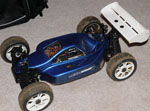
Finally managed to assemble everything together and attached is the final assembled state. Now lets see how it runs.. |
|
|
|
|
|
|
|
|
|
|
|
|
(#29)
|
|
RC-Monster Mod
Offline
Posts: 4,217
Join Date: Apr 2006
Location: Chicago, IL
|
02.13.2008, 11:44 AM
Looks great! Lets see a couple with the lid off

to make it... or break it... Silent...But Deadly |
|
|
|
|
|
|
 |
«
Previous Thread
|
Next Thread
»
| Currently Active Users Viewing This Thread: 1 (0 members and 1 guests) | |
 Linear Mode

|
|

Powered by vBulletin® Version 3.8.11
Copyright ©2000 - 2026, vBulletin Solutions Inc.
vBulletin Skin developed by: vBStyles.com
Copyright ©2000 - 2026, vBulletin Solutions Inc.
vBulletin Skin developed by: vBStyles.com
