
 |
|
|
|
|
|
 |


 |
Sidewinder / Castle Link : No controller or invalid controller |
 |

|
 |

|
(#1)
|
|
Guest
Posts: n/a
|
 Sidewinder / Castle Link : No controller or invalid controller -
09.09.2008, 03:43 PM
Sidewinder / Castle Link : No controller or invalid controller -
09.09.2008, 03:43 PM
Hi,
To begin please forgive me for my bad English, I am french, I hope you will understand me ... I just bought a "Sidewinder ESC 1/10 & CMS 4600 combo", a "CC BEC", and a "Castle Link USB Programming Kit". I do not have problem for programming the "CC BEC" with the "Castle Link USB Programming Kit" it works perfectly. But when I plug the "Sidewinder ESC" the "Castle Link software" says "No controller or invalid controller".  In the "Castle link Software" the "USB Connection Status" is green, the "Device Connection Status" is green too, but the software does not recognize the ESC. I have only the "About" tab, and if I try to read setting or anything else from the ESC the software telling me : "No controller or invalid controller".  For your information I use the last "Castle Link software" version 3.11 with Windows XP, and otherwise the motor works perfectly with the controller to run my 1/10 buggy. Can you help me?  Thank you in advance for your reply. Sincerely |
|
|

|
 |
 |
 |
|
|
|
|
|
|
(#2)
|
|
5,280 feet above sea level

Offline
Posts: 87
Join Date: Oct 2008
Location: Denver, CO
|
10.18.2008, 01:13 PM
Too the top, I am having the same problem
Any ideas? I am able to up-date my Mamba 25. This is the message I keep getting 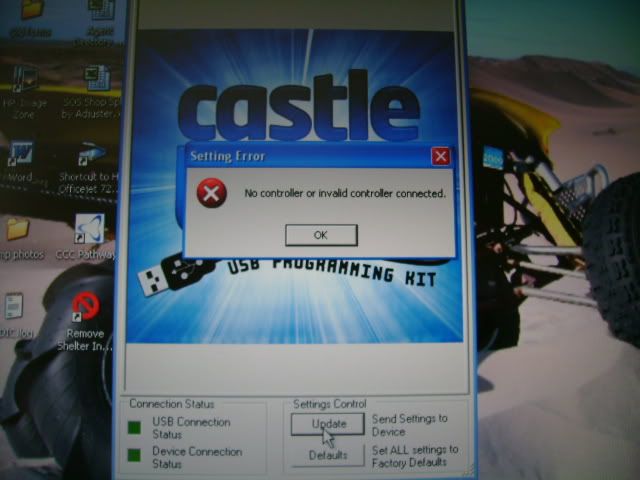
AX10 Venom Creeper Slash 2WD Slash 4WD |
|
|
|
|
|
|
|
|
|
|
|
|
(#3)
|
|
RC-Monster Stock
Offline
Posts: 27
Join Date: May 2009
|
05.30.2009, 10:00 PM
Same Problem, have not even plugged in the lipos yet...

|
|
|
|
|
|
|
|
|
|
|
|
|
(#4)
|
|
RC-Monster RC8T
Offline
Posts: 2,554
Join Date: Jan 2008
Location: Syracuse, New York (Camillus)
|
05.30.2009, 10:23 PM
You said you have the CC BEC. Is the BEC set up with the controller? Did you already remove the red wire from the esc receiver plug? IF so that is most likely the problem, otherwise....I have no idea.
SC10 MMPro 13.5T 2s NeuEnery 5000mah RC18T Mamba 25/5400kv 2s lipo + 6s NiMh |
|
|
|
|
|
|
|
|
|
|
|
|
(#5)
|
|
Guest
Posts: n/a
|
05.31.2009, 05:45 AM
Same problem here too, i thought i was the only one.
I only have this problem with my Sidewinder, mamba max witch the program works fine (both of them) and my MMM is also working like it should. I tried 2 Castle link cables to see if that was my problem but it dosn't matter at all, they both work. Once i plug in my sidewinder the castle link program shuts of and gives me an error window saying it encouterend a serious error. Please CC help us ;) |
|
|
|
|
|
|
|
|
|
|
|
|
(#6)
|
|
RC-Monster Stock
Offline
Posts: 27
Join Date: May 2009
|
05.31.2009, 09:09 AM
Well i figured my problem after a lot of brain bashing... Downgraded the firmware to 1.19, and it worked... Ya-hoo

|
|
|
|
|
|
|
|
|
|
|
|
|
(#7)
|
|
RC-Monster Dual Brushless
Offline
Posts: 4,236
Join Date: Dec 2007
Location: Cape Cod, Mass.
|
05.31.2009, 09:18 AM
I had the same problem.....to make a long story short contact Thomas at castle.. ext.125.....he walked me through this fix in 10 min. I would have a hard time explaining how to fit it. Basicially, in the installation process you have to rename a file which is causing the problem. As you are installing the program, check each window carefully before you agree/accept anything..look for a window to pop up which allows you to rename a file. That's basically it. However, Thomas knows which window to look for...so I would wait for him.
2. MBX-5T 1520, MMM ON 5S 3. MBX-5 ONROAD CONVERSION 1515, MMM ON 5S 4. MRX-3 ON ROAD CONVERSION 1512, MMM ON 6S 5. TEN T 2650 T8, MMP ON 3S |
|
|
|
|
|
|
|
|
|
|
|
|
(#8)
|
|
|
Guest
Posts: n/a
|
05.31.2009, 09:29 AM
Quote:
 I want to program it because if i rive with a 4600kv motor and the sidewinder sometimes the esc stops working and start cogging if i want to drive. Could it be broken fets? Sorry for the off topic but maybe its related
|
|
|
|
|

|
|
|
|
|
|
|
|
|
(#9)
|
|
Guest
Posts: n/a
|
05.31.2009, 11:18 PM
I had the same problem with my mamba 1/18 ESC.I had to down grade the version software to get it to work
|
|
|
|
|
|
|

|
|
|
|
|
|
(#11)
|
|
RC-Monster Carbon Fiber

Offline
Posts: 301
Join Date: Feb 2008
|
06.02.2009, 11:58 AM
Hey fellas, sorry I haven't posted sooner, we're down a man in tech support so we're struggling to keep caught up. It looks like were looking at a few different problems here.
FxPatrice and anyone with Sidewinder connection issues: Your problem is because of a small glitch in our software. The way it shows itself is both connection status boxes will be green, but you only have the About tab and if you try to click anything you get the "No controller or invalid controller error". There was a line of code that did not allow newer versions of the Castle Link to recognize the Sidewinder with V1.15 firmware; every other product will connect without any problems. Download the latest version of the Castle Link (V3.13), our engineers have fixed the coding glitch and it will connect without any problems. You can download the latest version here. Magman: The problem here was after installing the latest version of the Castle Link, when you open the Link it still thinks it's an older version (You can check be clicking Help > About). The only way to fix this is to uninstall the program, and reinstall it to a different directory on the computer. This problem is a little different because it won't allow any controller with newer firmware to connect, even though you have the latest version installed. The other problem was only with sidewinders with a specific firmware version (V1.15). FreakyCrawler: Is anything running hot? Cogging usually occurs when something is heating up abnormally. It could also be caused by a bad or loosed connection between the speed control and motor. If there is a bad connector or solder joint, it will cause the motor to two phase, where it just stutters and kicks back and forth. Hope this helps clear things up a bit, but if you continue to have problems or have any other questions, just let me know and I'll do my best to help. Thomas Porfert Castle Tech Support |
|
|
|
|
|
|
|
|
|
|
|
|
(#12)
|
|
|
Guest
Posts: n/a
|
06.02.2009, 01:04 PM
Quote:
Also i cant connect it to castle link because when i put my esc in the castle link, the program shuts down. Thanks |
|
|
|
|
|
|
|
 |
«
Previous Thread
|
Next Thread
»
| Currently Active Users Viewing This Thread: 1 (0 members and 1 guests) | |
 Linear Mode

|
|

Powered by vBulletin® Version 3.8.11
Copyright ©2000 - 2026, vBulletin Solutions Inc.
vBulletin Skin developed by: vBStyles.com
Copyright ©2000 - 2026, vBulletin Solutions Inc.
vBulletin Skin developed by: vBStyles.com
