
 |
|
|
|
|
|
 |


 |
Rhino 5s1p 4900mAh 20C Lipo Problem |
 |

|
 |

|
(#1)
|
|
Brushless Mentat

Offline
Posts: 353
Join Date: Jun 2009
Location: Outside Louisville KY
|
Rhino 5s1p 4900mAh 20C Lipo Problem -
06.24.2009, 03:37 PM
HI guy, got to take my 8ight-t to the track yesterday for the first time and loved it. I have 2 batteries a Turnigy 5000mAh 25C 4s1p ZERO issues so far. Then there is the Rhino 5s1p 4900mAh 20C pack. after 1 charge/discharge its now showing only 4 cells when i connect to my charger which is a Thunder T6 6 cell charger/balancer (pic below) this charger has worked flawless with my 2 other packs i have which are for my slash they are 2 cell lipos. Is there some test i can do to find out if i really have a bad cell? Currently the cell is discharged i used the castle creations mamba monster ESC with the voltage cut off set correctly to 15v for a 5 cell pack and it stopped running just like my 4 cell did yesterday when it got to low. Not sure what to do at this point. I know the charger has Lipo Balancing/Lipo Charge/Lipo Fast Charge/Lipo Discharge/Lipo Storage settings i have only ever used lipo Balance on any of my packs. There is also a settings that i cant really make sense of, it reads like this (silly chinese manuals) Heading is as follows:
Voltage Balancing and monitoring during the discharge. The processor monitors the voltage of the individual cells during the "storage-mode" and the "discharge mode" of the lithum battery pack. It tries to normalize the voltages to be equal. For this feature, the individual plug of the battery pack should be connected to the individual port of the charger. (is this talking about the balancing port? any way here is the rest) If the voltage of one or more of the cells varies abnormally during the procedure, it terminates the process forcibly with the error message. If this happens the battery pack contains the bad cell, or the bad connection of the cable or plug. You can easily know which one cell is bad by pressing INC button at time of showing the error message. This is word for word from the manual. At any rate i always charge my packs at what i believe is 1C which in the case of the 5 cell pack is 4.9 AMPS because its a 4900mAh pack (correct me if im wrong). Do i need to cycle (charge/discharge) a pack before i use it? I had thought Lipo was different. HELP! 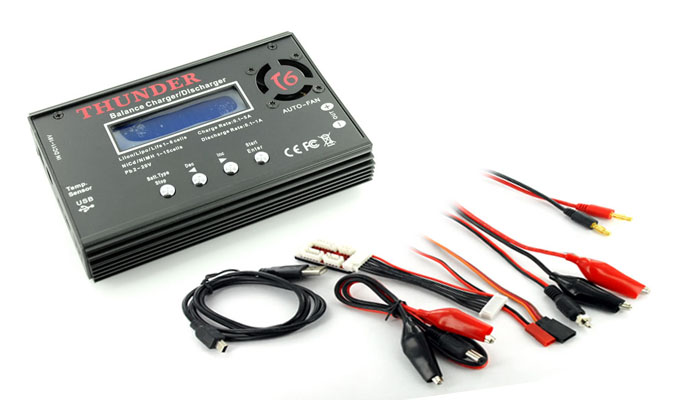 
8ight 1.0 & 2.0 | 8ight-T 1.0 & 2.0 | E-Revo BL Edition | T-Maxx | Slash | Raze-ST | XXX-NT Drake | 3PKS | DX3S Telemetry |
|
|

|
 |
 |
 |
|
|
|
|
|
|
(#2)
|
|
Brushless Mentat
Offline
Posts: 353
Join Date: Jun 2009
Location: Outside Louisville KY
|
06.24.2009, 08:21 PM
WOW 30 views now answers LOL
8ight 1.0 & 2.0 | 8ight-T 1.0 & 2.0 | E-Revo BL Edition | T-Maxx | Slash | Raze-ST | XXX-NT Drake | 3PKS | DX3S Telemetry |
|
|
|
|
|
|
|
|
|
|
|
|
(#3)
|
|
RC-Monster Brushless

Offline
Posts: 2,466
Join Date: Jan 2006
Location: Florida
|
06.24.2009, 08:25 PM
I would suggest trying to measure the voltage of each cell at the balance tap. If you can only measure 4, it's likely your problem that you have a disconnected balance tap wire.
|
|
|
|
|
|
|
|
|
|
|
|
|
(#4)
|
|
|
Brushless Mentat
Offline
Posts: 353
Join Date: Jun 2009
Location: Outside Louisville KY
|
06.24.2009, 08:28 PM
Quote:
I have a few diff devices i can use to measure, not sure how tho. Which one should i use? and how? 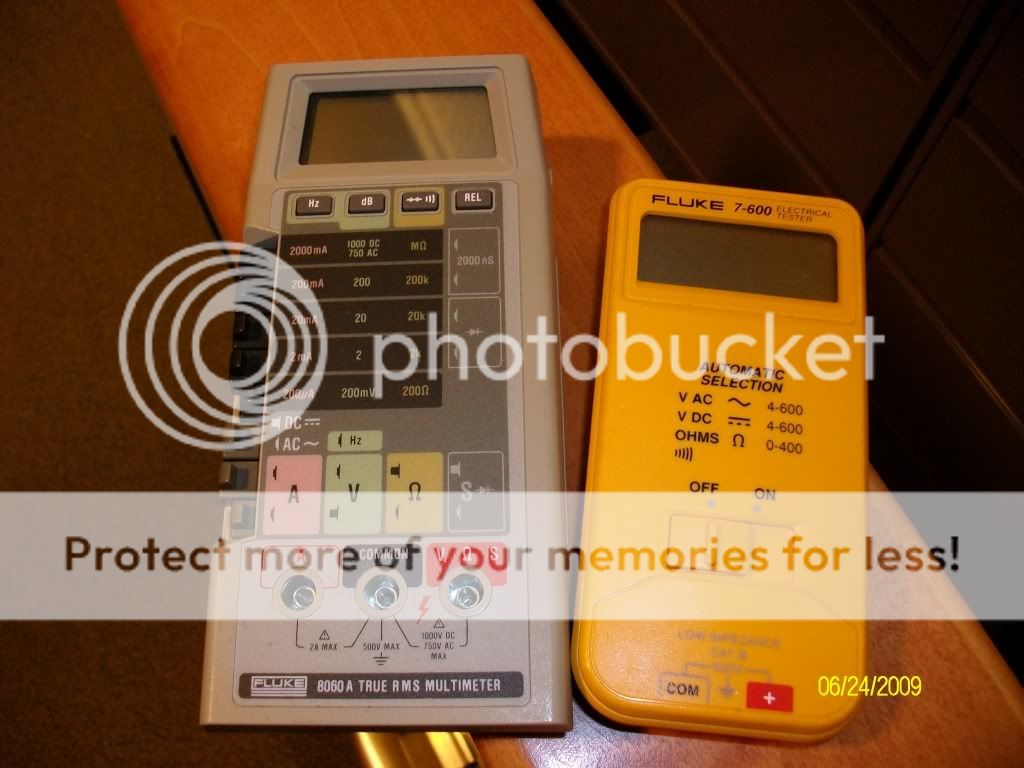
8ight 1.0 & 2.0 | 8ight-T 1.0 & 2.0 | E-Revo BL Edition | T-Maxx | Slash | Raze-ST | XXX-NT Drake | 3PKS | DX3S Telemetry |
|
|
|
|

|
|
|
|
|
|
|
|
|
(#5)
|
|
Brushless Mentat
Offline
Posts: 353
Join Date: Jun 2009
Location: Outside Louisville KY
|
06.24.2009, 08:29 PM
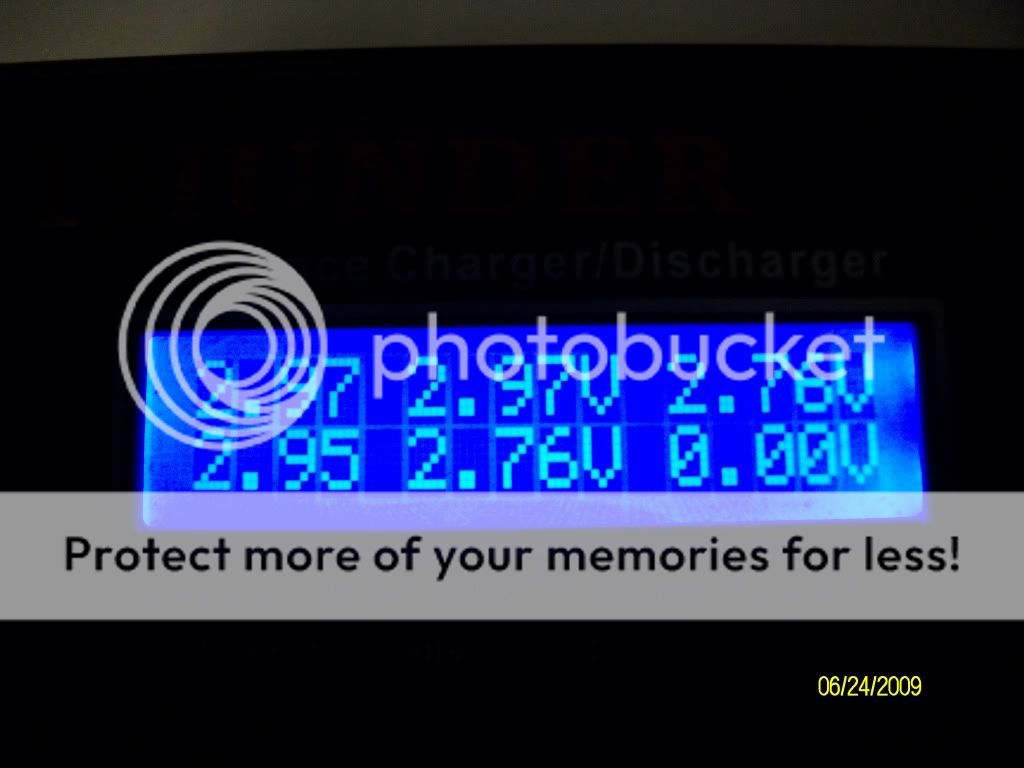
OH also my charger gave me this info on the cells. Ideals?
8ight 1.0 & 2.0 | 8ight-T 1.0 & 2.0 | E-Revo BL Edition | T-Maxx | Slash | Raze-ST | XXX-NT Drake | 3PKS | DX3S Telemetry |
|
|
|
|
|
|
|
|
|
|
|
|
(#6)
|
|
Old Skool

Offline
Posts: 7,494
Join Date: Feb 2007
Location: Devon, England
|
06.24.2009, 08:31 PM
Of the 6000 odd members, only a few dozen are regular posters, so....
There is a very simple trick you can perform; charge the lipo as a 4s pack until the voltage of each cell is at the nominal level or just over- thats 3.6v each, so the total voltage will be 18v. Now, stop the charge and restart it- the charger should recognize that you have a 5 cell pack and ask you to confirm this before it starts the charge. Im assuming when you connect it up and select 5s lipo, it only reads the pack as a 4s item? Thats due to the voltage of the pack being lower than the nominal/ resting voltage of a pack that size; the cells are discharged to ~3.0v per cell, but the charger is looking for 3.6v (or 18v vs ~15v, however you want to look at it), so it thinks you have a smaller voltage pack connected up. Its a fairly common issue, I get the same thing with my Bantam BC6 charger, so I just use that trick and it works every time. You can also charge the pack as a nimh pack at 1c until the voltage hits the needed level, then change it to the correct lipo setting and finish the charge. |
|
|
|
|
|
|
|
|
|
|
|
|
(#7)
|
|
Old Skool
Offline
Posts: 7,494
Join Date: Feb 2007
Location: Devon, England
|
06.24.2009, 08:32 PM
I love being right all the time
 
|
|
|
|
|
|
|
|
|
|
|
|
|
(#8)
|
|
|
Brushless Mentat
Offline
Posts: 353
Join Date: Jun 2009
Location: Outside Louisville KY
|
06.24.2009, 08:34 PM
Quote:
I like your ideal. so i just set my charger for 4 cells @ 4.9 AMPS and let it do a full charge? Once done the try to charge again as a 5 cell? I should still use the LIPO BALANCE SETTTINGS right? Thanks for all the help you have give/suggested in all my other threads Suicideneil 8ight 1.0 & 2.0 | 8ight-T 1.0 & 2.0 | E-Revo BL Edition | T-Maxx | Slash | Raze-ST | XXX-NT Drake | 3PKS | DX3S Telemetry |
|
|
|
|
|
|
|
|
|
|
|
|
|
(#10)
|
|
|
Old Skool
Offline
Posts: 7,494
Join Date: Feb 2007
Location: Devon, England
|
06.24.2009, 08:39 PM
Yes and no. Set it for 4s lipo and 4.9amps, but only charge it until the cell voltage is 3.6v, and the total voltage is 18v. Then you MUST stop the charge and restart it as a 5s lipo at 4.9amps. Make sure the balancer plug is connected and you select the 'balance charge' mode/option.
Quote:

|
|
|
|
|
|
|
|
|
|
|
|
|
|
(#11)
|
|
Brushless Mentat
Offline
Posts: 353
Join Date: Jun 2009
Location: Outside Louisville KY
|
06.24.2009, 08:43 PM
suicideneil, thanks so much, i deleted the other post, i figured this one was way to long and nobody wanted to take a crack at this issue. Im charging now at the settings you specified, Im not to sure on when it will be at 3.6v tho. People keep taking about using a meter to check the voltage but i am not sure on how to do this. suggestions?
8ight 1.0 & 2.0 | 8ight-T 1.0 & 2.0 | E-Revo BL Edition | T-Maxx | Slash | Raze-ST | XXX-NT Drake | 3PKS | DX3S Telemetry |
|
|
|
|
|
|
|
|
|
|
|
|
(#12)
|
|
Brushless Mentat
Offline
Posts: 353
Join Date: Jun 2009
Location: Outside Louisville KY
|
06.24.2009, 08:57 PM
I LOVE YOU MAN! That fixed it. So now comes the part about Low Voltage CUTOFF. what is a good setting being that 3.0 seems to be to low for this pack. anything about that? like 3.2 3.3?
8ight 1.0 & 2.0 | 8ight-T 1.0 & 2.0 | E-Revo BL Edition | T-Maxx | Slash | Raze-ST | XXX-NT Drake | 3PKS | DX3S Telemetry |
|
|
|
|
|
|
|
|
|
|
|
|
(#13)
|
|
Old Skool
Offline
Posts: 7,494
Join Date: Feb 2007
Location: Devon, England
|
06.24.2009, 09:00 PM
Just keep checking the pack, shouldnt take more than 5-10 minutes- you should be able to view the individual cell voltages like in your pictures above during the charge.
As for the other question, you should have two nice pointy probes with the multi meters, a red one and black one ( + and - ). Set the voltage on the grey one to the '2v' option (adjusts the sensitivity), and plug the probes into the 'A' (red) and common (black) sockets. Now, on the lipos balancer plug, there should be 5 red wires (or coloured wires) and one black one. Place the tip of the black probe onto the metal tab of the black wire in the balancer plug, and the red probe onto each red wire's tab, one at a time & in sequence. You should be able to then see the voltage of each cell, or the combined voltages as you go along the line of tabs so to speak (just deduct the first voltage from the second result, and the 1st and 2nd voltage from the 3rd result to work out the individual voltages of each cell). Your charger should be fairly accurate with the cell voltages, but you can also buy awesome little voltage checkers that plug into the balance plug and tell you the voltages too: http://www.hobbycity.com/hobbycity/s...y_Monitor_2-6S Good http://www.hobbycity.com/hobbycity/s...itor_2-6S_Lipo Very good http://www.hobbycity.com/hobbycity/s...~6S_(Version_2) Really good http://www.hobbycity.com/hobbycity/s..._Polymer_Packs Awesome Mmm, man love... 3.2v per cell should be fine- 2.7-2.9v isnt too bad, but it would be better if they stayed around 2.9-3.1v once they are discharged. Seems like 2 cells are little bit weaker than the other two, but not by much, and since they arent matched cells, thats pretty normal behaviour. |
|
|
|
|
|
|
|
|
|
|
|
|
(#14)
|
|
|
RC-Monster Dual Brushless

Offline
Posts: 4,236
Join Date: Dec 2007
Location: Cape Cod, Mass.
|
06.24.2009, 09:04 PM
Quote:
2. MBX-5T 1520, MMM ON 5S 3. MBX-5 ONROAD CONVERSION 1515, MMM ON 5S 4. MRX-3 ON ROAD CONVERSION 1512, MMM ON 6S 5. TEN T 2650 T8, MMP ON 3S |
|
|
|
|
|
|
|
|
|
|
|
|
|
(#15)
|
|
Guest
Posts: n/a
|
06.24.2009, 09:06 PM
your charger should show you individual cell voltages, or just stop the charger at 18v
|
|
|
|
|
|
|
 |
«
Previous Thread
|
Next Thread
»
| Currently Active Users Viewing This Thread: 1 (0 members and 1 guests) | |
 Linear Mode

|
|

Powered by vBulletin® Version 3.8.11
Copyright ©2000 - 2026, vBulletin Solutions Inc.
vBulletin Skin developed by: vBStyles.com
Copyright ©2000 - 2026, vBulletin Solutions Inc.
vBulletin Skin developed by: vBStyles.com
