
 |
|
|
|
|
|
 |


 |
 |

|
 |

|
(#16)
|
|
RC-Monster Carbon Fiber

Offline
Posts: 376
Join Date: Oct 2009
Location: Nashville,TN
|
06.28.2010, 10:36 AM
I have been waiting to post on the durability of the Evercool fan till I had a few races on them and after four races both are still working great! The one in the CC Blower runs all the time while the one in the MMM only comes on after about 5 min. of running and in this heat sometimes in 2 to 3 min. So far so good!

|
|
|

|
 |
 |
 |
|
|
|
|
|
|
(#17)
|
|
|
RC-Monster Carbon Fiber
Offline
Posts: 130
Join Date: Feb 2010
Location: Hilo, Hawaii
|
06.29.2010, 04:12 PM
Quote:
It does feels a bit cheaper than I'm used to for a Castle product (very stiff plastic and wires), but it does the job. I haven't had any problems with it yet, although if/when the fan dies you've shown people a replacement option 
|
|
|
|
|

|
|
|
|
|
|
|
|
|
(#18)
|
|
|
RC-Monster Carbon Fiber
Offline
Posts: 376
Join Date: Oct 2009
Location: Nashville,TN
|
06.29.2010, 04:39 PM
Quote:

|
|
|
|
|
|
|
|
|
|
|
|
|
|
(#19)
|
|
|
RC-Monster Carbon Fiber
Offline
Posts: 130
Join Date: Feb 2010
Location: Hilo, Hawaii
|
06.29.2010, 05:01 PM
Quote:
What you're effectively saying in PC terms is that instead of having system/cpu fans inside the case, it's much better to take out the fans and instead put the entire case in front of a fan moving huge amounts of air. Sure, backpressure will drop CFM's but what's the point if what CFM's you have are not being used effectively? |
|
|
|
|
|
|
|
|
|
|
|
|
|
(#20)
|
|
|
RC-Monster Carbon Fiber
Offline
Posts: 376
Join Date: Oct 2009
Location: Nashville,TN
|
06.29.2010, 05:16 PM
Quote:
|
|
|
|
|
|
|
|
|
|
|
|
|
|
(#21)
|
|
RC-Monster Carbon Fiber
Offline
Posts: 376
Join Date: Oct 2009
Location: Nashville,TN
|
06.29.2010, 05:26 PM
If you want to relate this to a cpu, you can have as many fans inside the box as you want but if you don't have fans removing the air from the box you are doing nothing but circulating hot air in the box!
|
|
|
|
|
|
|
|
|
|
|
|
|
(#22)
|
|
|
RC-Monster Carbon Fiber
Offline
Posts: 130
Join Date: Feb 2010
Location: Hilo, Hawaii
|
06.29.2010, 05:44 PM
Quote:
Also, what you said about the pc (not cpu) is entirely correct, it's not the best analogy but that's what I've been trying to tell you. The shrouding ducts the fan so it will push air across the maximum amount of motor surface area while keeping a decent amount of airflow. Pull air through the case (ie. what has to be cooled) even though there's vents, cabling, etc. in the way rather than blast only one part of it with high speed air. |
|
|
|
|
|
|
|
|
|
|
|
|
|
(#23)
|
|
RC carbon junkie
Offline
Posts: 634
Join Date: Dec 2007
Location: Iowa
|
06.29.2010, 08:01 PM
My Blower snapped when I tightened the zip-ties too tight.My fault,but its not that sturdy.Can a cooler motor effect the ESC performance/temps?
Slash 4x4 MMP CC SC 2400 SC RC8BE MMP Neu Tekno 1512/2D Mugen MBX6 Eco MMP Neu Tekno 1515/1.5D |
|
|
|
|
|
|
|
|
|
|
|
|
(#24)
|
|
RC-Monster Carbon Fiber
Offline
Posts: 376
Join Date: Oct 2009
Location: Nashville,TN
|
06.29.2010, 08:13 PM
Well the bottom line is I'm not cooling a "PC" I'm cooling a 1/8th E buggy motor under race conditions. Before the mod to the shroud my motor temps after a 15min main ran between 170/180f after 160/170f but I believe I can do better than that by taking one of these and removing the nose piece and splitting the rest in half. With this fan bracket I can mount a 40x10mm fan instead of the 30x7mm. The reason I know this will work better is I already have this setup on a Tekno 2200kv motor and it temps at 150/160f after a 15min main.
Here is the Tekno setup on my O'Donnell Z01-Be 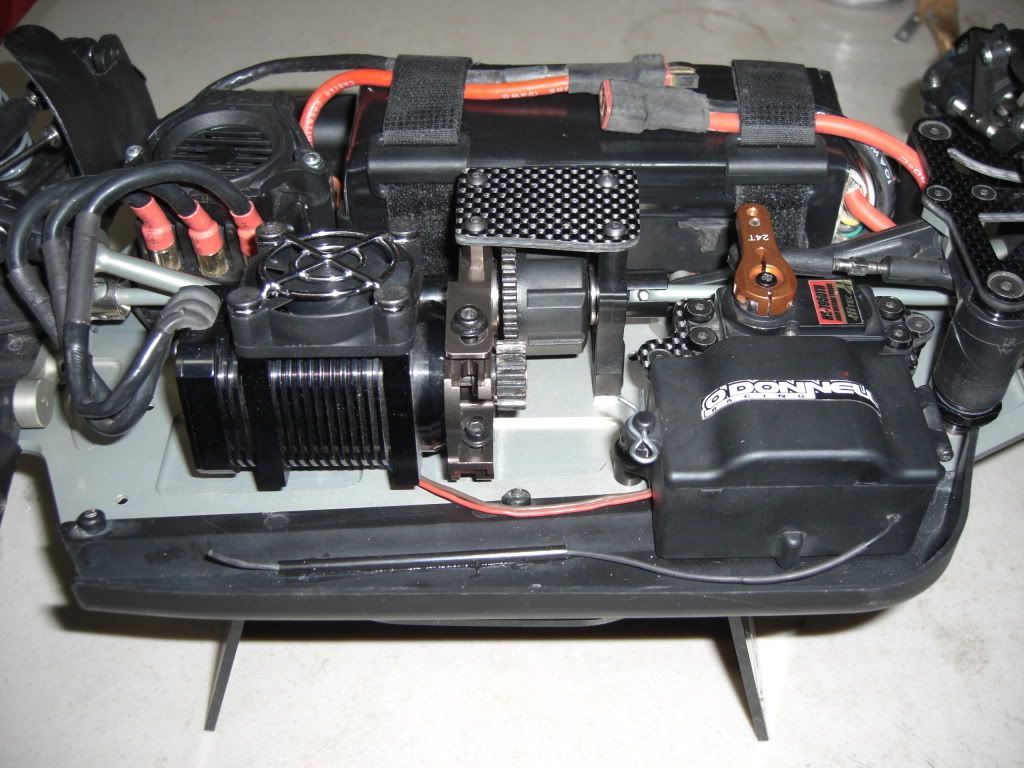
|
|
|
|
|
|
|
|
|
|
|
|
|
(#25)
|
|
|
RC-Monster Carbon Fiber
Offline
Posts: 376
Join Date: Oct 2009
Location: Nashville,TN
|
06.29.2010, 08:15 PM
Quote:
|
|
|
|
|
|
|
|
|
|
|
|
|
|
(#26)
|
|
|
RC-Monster Carbon Fiber
Offline
Posts: 130
Join Date: Feb 2010
Location: Hilo, Hawaii
|
06.29.2010, 08:28 PM
Quote:
|
|
|
|
|
|
|
|
|
|
|
|
|
|
(#27)
|
|
|
RC-Monster Carbon Fiber
Offline
Posts: 376
Join Date: Oct 2009
Location: Nashville,TN
|
06.29.2010, 08:32 PM
Quote:
|
|
|
|
|
|
|
|
|
|
|
|
|
|
(#28)
|
|
|
RC-Monster Carbon Fiber
Offline
Posts: 376
Join Date: Oct 2009
Location: Nashville,TN
|
06.29.2010, 08:33 PM
Quote:
|
|
|
|
|
|
|
|
|
|
|
|
|
|
(#29)
|
|
|
RC-Monster Titanium

Offline
Posts: 1,697
Join Date: Mar 2008
|
06.29.2010, 08:36 PM
Quote:
I'm interested in your long-term testing of the Evercool fan. Keep us posted! It's not any more expensive than the fan we are using now (in high quantity...) We do have a new version of the fan we are using now -- they made some changes to the fan to make it more durable (on the electronics side...) but it seems there is some variation in the blade durability. I'll talk to our supplier about beefing up the blades a bit on the 30x30 fan. Thanx! President, Principle Engineer Castle Creations |
|
|
|
|
|
|
|
|
|
|
|
|
|
(#30)
|
|
|
RC-Monster Carbon Fiber
Offline
Posts: 376
Join Date: Oct 2009
Location: Nashville,TN
|
06.29.2010, 08:42 PM
Quote:

|
|
|
|
|
|
|
|
 |
«
Previous Thread
|
Next Thread
»
| Currently Active Users Viewing This Thread: 1 (0 members and 1 guests) | |
 Linear Mode

|
|

Powered by vBulletin® Version 3.8.11
Copyright ©2000 - 2026, vBulletin Solutions Inc.
vBulletin Skin developed by: vBStyles.com
Copyright ©2000 - 2026, vBulletin Solutions Inc.
vBulletin Skin developed by: vBStyles.com
